Psychiatry EMR with prescriptions, follow-ups and outcome tracking
Prescribe on your letterhead, see what changed since the last follow-up, track PHQ-9 and GAD-7 between visits, and run bookings, payments and online consultations from one place.
A busy OPD leaves little time for the record
- Follow-ups start from scratch because the last visit’s notes are hard to find.
- Rating scales are filled in on paper and never charted.
- Prescriptions are typed into a tool that knows nothing about the patient’s history.
- When a patient is at risk, the psychologist down the corridor doesn’t know.
Prescriptions on your letterhead
Write medicines with dose, timing and duration, add the investigations you want, and print on the clinic’s or branch’s letterhead. Patients can download the prescription from their appointment history.
In short
- AI can draft a prescription and suggest tests for you to review
- A warning when a test that should come before starting a medicine is missing
- The patient’s age is worked out as of the visit date, even on a reprint
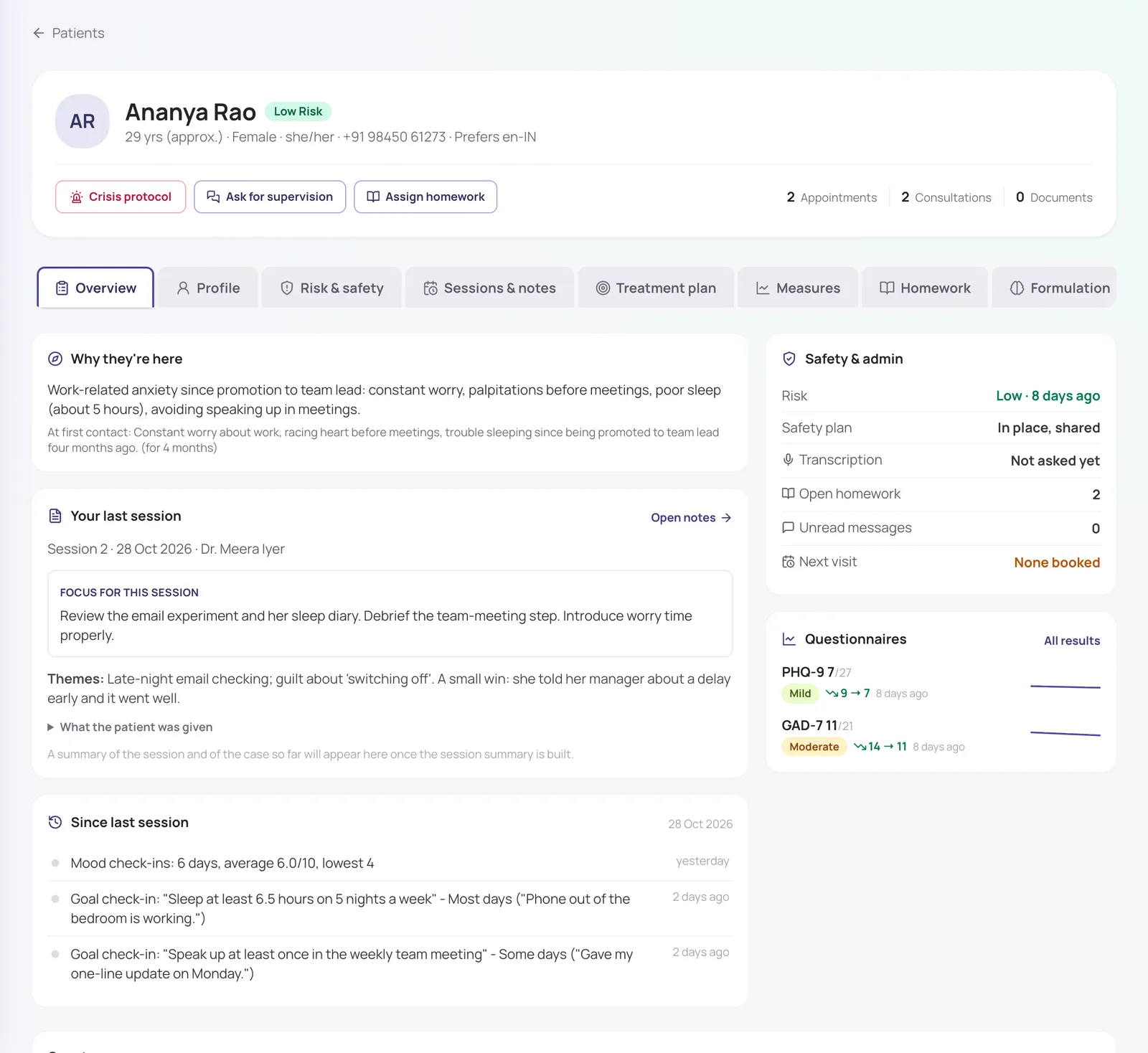
Follow-ups that start where you left off
The patient record opens on what matters: why they came, what you planned last time, and everything since: questionnaire scores, mood check-ins, messages, missed visits and sessions with colleagues.
- Diagnosis, prescription, tests and advice in each consultation
- Patients upload test reports to their appointment, linked to the test you advised
- Every change to the record kept in an audit trail
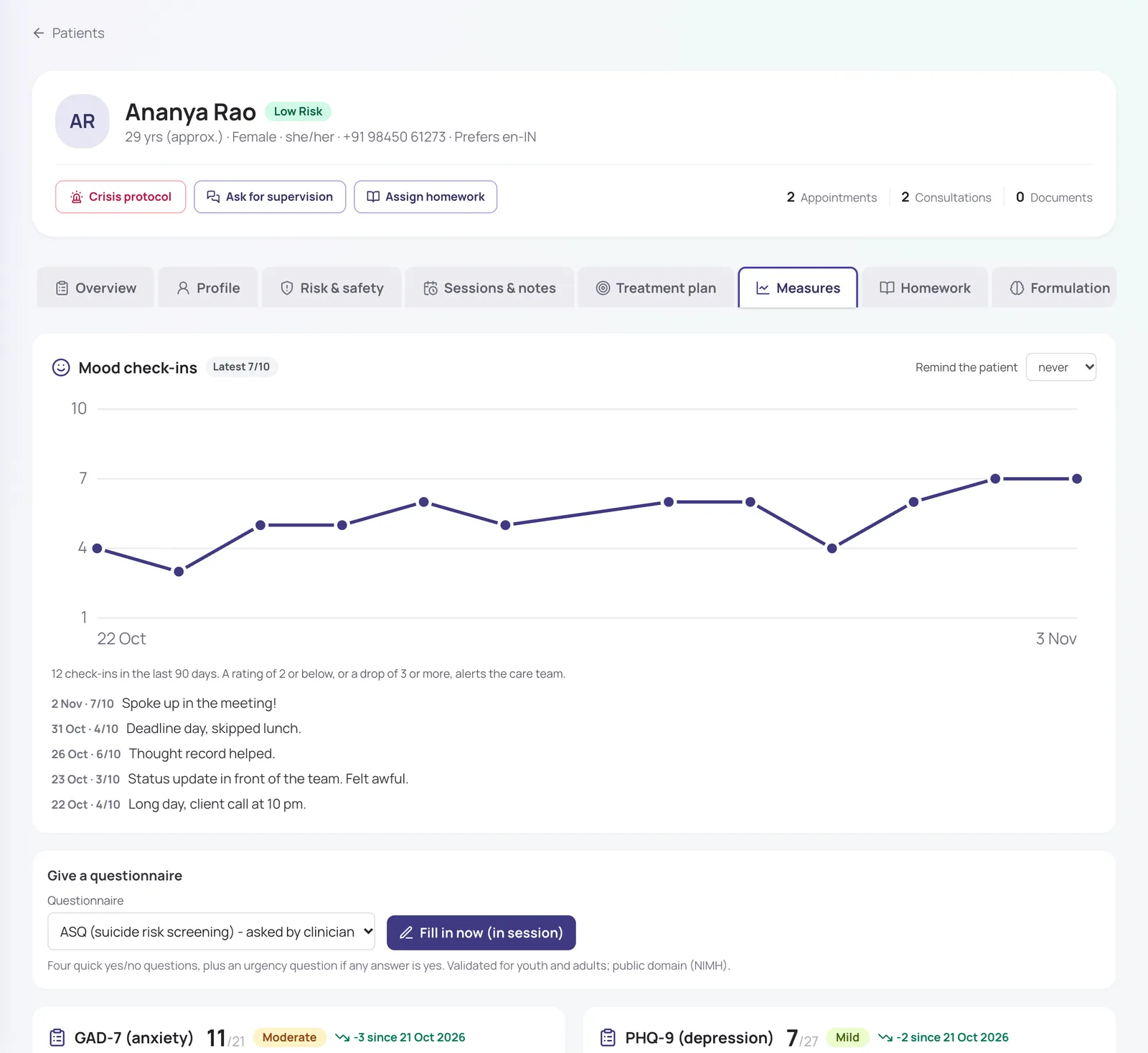
Rating scales charted for you
Send PHQ-9, GAD-7, PCL-5, AUDIT, ASRS and more to the patient’s phone before a follow-up, or fill one in during the visit. Scores are charted, with the change since the first result.
In short
- Official Hindi and Marathi PHQ-9 and GAD-7
- PHQ-9 item 9 above 0 alerts the care team at once
- The ASQ suicide screener, with a suggested risk assessment
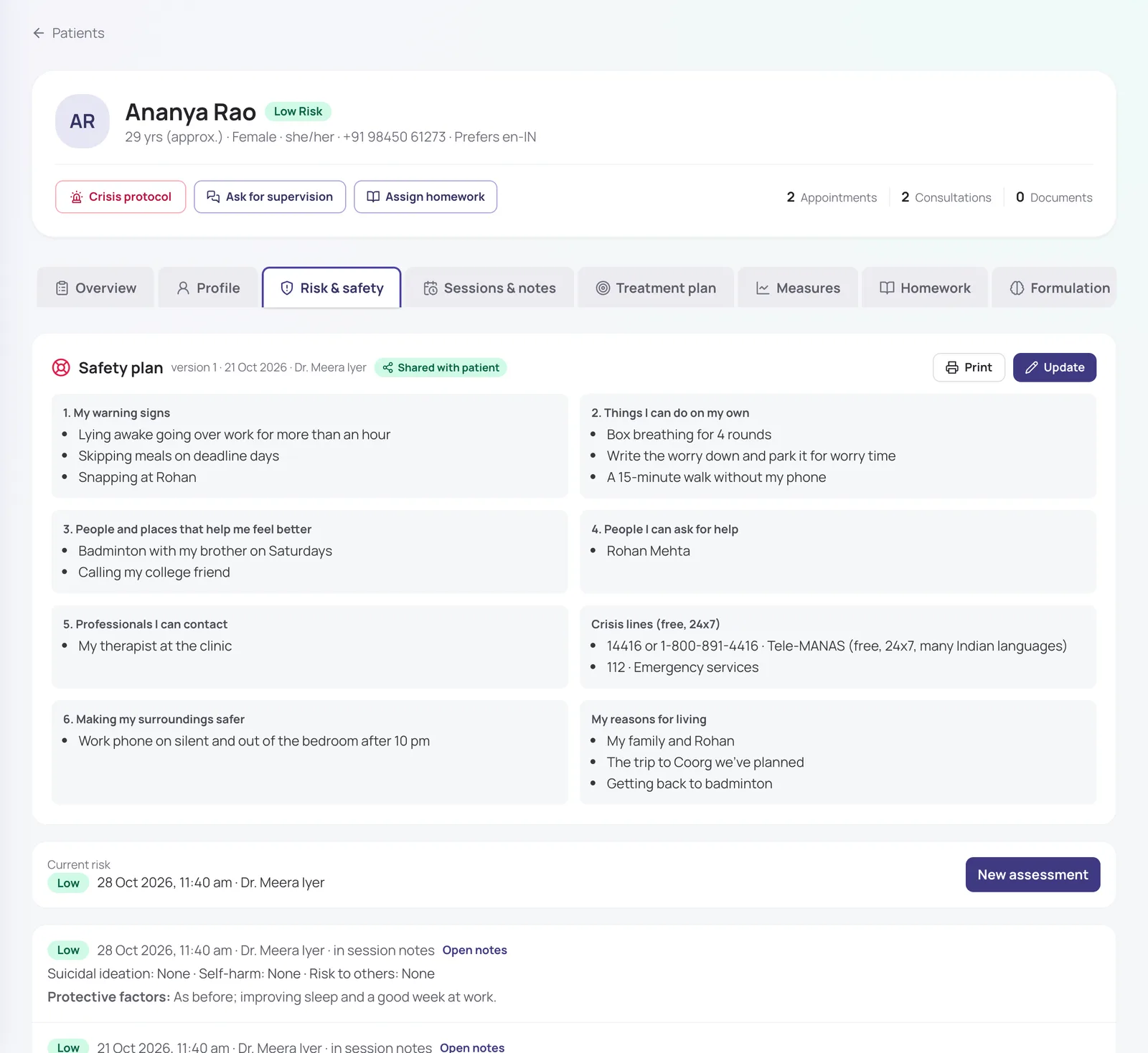
Risk, safety plans and crisis alerts
Record structured risk assessments, keep a register of patients at moderate or high risk, and build a safety plan the patient keeps on their phone. One button alerts the care team in a crisis, and escalates to admins if nobody responds.
- Tele-MANAS and 112 always on screen
- Patients can tap "Get help" in their app
- High-risk patients not seen in 14 days are flagged
Work alongside psychologists
Psychiatrists and psychologists share a care team for each patient. Therapists write notes in SOAP, DAP or BIRP and their visits print as a visit summary, never as a prescription. Reception books and takes payments without ever seeing clinical notes.
In short
- Care-team-only access to clinical notes
- Supervision requests and note review
- Branch-restricted logins for front-desk staff
Also included
Online consultations
Video or voice calls patients join from their phone, paid before they start.
Payments
UPI, cards and net banking, or pay at the clinic, with refunds and cancellation rules.
Multi-branch OPDs
Shifts at several branches, each with its own letterhead and holidays.
Reminders
Patients are reminded a day and two hours before their visit.
How it works
- 1
Sign up and set your weekly OPD hours, per branch if you work at several.
- 2
Share your booking link, or let reception book patients in.
- 3
See the patient, prescribe and advise tests from the consultation.
- 4
Patients get the prescription, reminders and questionnaires on their phone.
Frequently asked questions
Can I prescribe after a teleconsultation?
Yes, within the Telemedicine Practice Guidelines 2020. Medicines in Schedule X and narcotic or psychotropic substances under the NDPS Act, such as benzodiazepines, can’t be prescribed by teleconsultation. MindConnect doesn’t decide this for you; it remains your clinical judgement.
Do psychologists in my clinic get a prescription pad too?
No. Only clinicians whose specialty can prescribe get the Rx format. A psychologist’s or counsellor’s session prints as a visit summary or consultation note.
Can patients send me their test reports?
Yes. Patients upload reports to an appointment from their app and can link each one to a test you advised. You see them in the consultation, tagged as from the patient.
Is every feature switched on from day one?
The essentials are on as soon as you sign up. Clinical and advanced features (questionnaires, safety plans, AI notes, supervision and so on) are switched on for your practice when you want them. Tell us what you need and we will turn it on.
How much does it cost?
Pricing depends on how many clinicians you have, the billing cycle you choose (monthly, quarterly, half-yearly or yearly) and whether you want AI features as a monthly add-on or pay per AI session. Start with a free trial, or send us a message and we will share a quote.
Try it with your own practice
Start a free trial, or tell us about your practice and we will share pricing and switch on the features you need.