Online appointment booking with payments, for doctors and clinics
A booking link for every doctor, real-time slots, payment online or at the clinic, and reminders that cut no-shows, all landing in the same calendar your team uses.
Bookings by phone call eat your day
- The front desk spends hours confirming and reconfirming slots.
- Patients book and don’t turn up, and the slot is wasted.
- Payments are chased after the visit.
- Two people book the same slot.
A booking link for every doctor
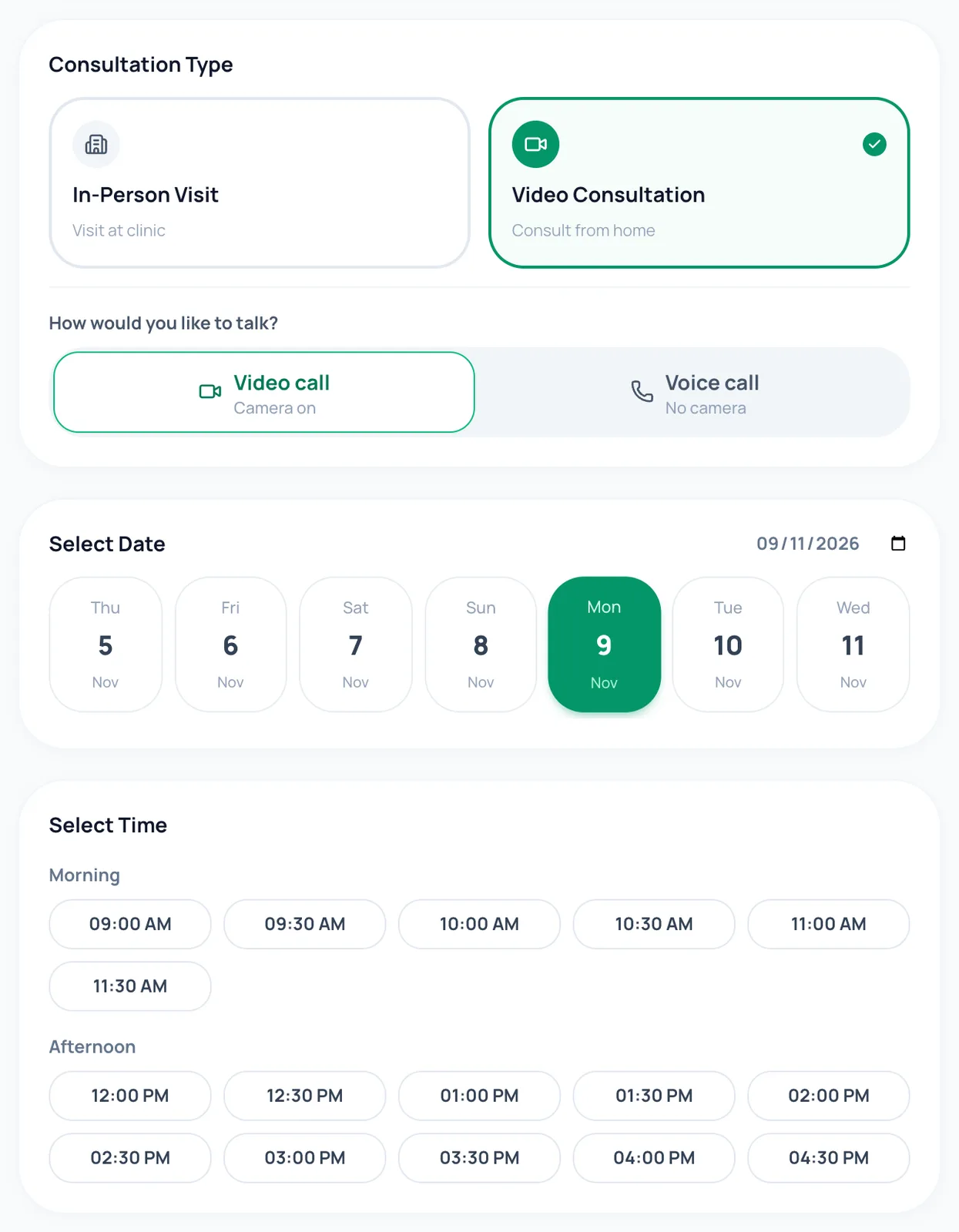
Share it on WhatsApp, Instagram, Google or your own website. Patients sign in with a code sent to their mobile, pick in-person or online, choose the location and a free slot, and they are booked.
In short
- A clinic page listing all your doctors
- Family members can book on one phone number
- Patients only see slots that are genuinely free
Pay online or at the clinic, your choice
Take UPI, cards, netbanking and wallets through Razorpay, offer pay-at-clinic, or both. The price is always set by the server, so it can’t be changed in the browser.
In short
- Choose which payment methods to offer
- Branch promotions show the original price struck through
- Automatic invoices for every online payment
Fewer no-shows
Reminders go out a day and two hours before. A cancellation policy with an optional late-cancellation fee is shown at booking, and missed visits are recorded.
In short
- Limits on open pay-at-clinic bookings stop one person blocking your diary
- A maximum booking window, e.g. 30 days ahead
- Patients can reschedule to a genuinely free slot
Repeat appointments in one step
Book a course of weekly, fortnightly or four-weekly sessions at once. The patient accepts the whole series in one tap, and holidays and clashes are skipped for you.
- Each visit numbered "Visit 2 of 6"
- End the series early in one click
- Get-directions link for in-person visits
Also included
Earnings & payouts
See each payment, the gateway fee and what is paid out to you.
Staff booking
Reception can book for a patient and send them a confirm-and-pay request.
Calendar blocks
Block time for leave, admin or training; patients can’t book over it.
Messages
Patients message the clinic from their appointment.
How it works
- 1
Set your weekly hours, slot length and fees.
- 2
Choose online payment, pay at clinic, or both.
- 3
Share your booking link.
- 4
Bookings and payments appear in your appointments and finance pages.
Frequently asked questions
How do patients book?
They open your link, sign in with a one-time code sent to their mobile, choose the visit type, location and time, and pay online or choose pay at clinic.
Can patients reschedule or cancel themselves?
Yes, within your rules: only to free slots, inside your booking window, and with your cancellation policy and any late fee shown first.
When do I get the money from online payments?
Online payments are collected for you and paid out in batches, with each payment’s gateway fee shown so you know exactly what you receive.
Can I stop people booking too far ahead?
Yes. Set the maximum number of days ahead patients can book.
Is every feature switched on from day one?
The essentials are on as soon as you sign up. Clinical and advanced features (questionnaires, safety plans, AI notes, supervision and so on) are switched on for your practice when you want them. Tell us what you need and we will turn it on.
How much does it cost?
Pricing depends on how many clinicians you have, the billing cycle you choose (monthly, quarterly, half-yearly or yearly) and whether you want AI features as a monthly add-on or pay per AI session. Start with a free trial, or send us a message and we will share a quote.
Try it with your own practice
Start a free trial, or tell us about your practice and we will share pricing and switch on the features you need.