Clinic management software for one branch or many
Run several locations, doctors and front-desk staff from one place, with the right access for each person and a clear view of how the whole practice is doing.
Growing past one room gets messy fast
- Each branch keeps its own diary, and nobody sees the whole picture.
- Front-desk staff can see more patient detail than they should.
- A doctor working at two locations confuses patients about where to go.
- You only find out a clinician is behind on notes when something goes wrong.
Branches with their own address, letterhead and holidays
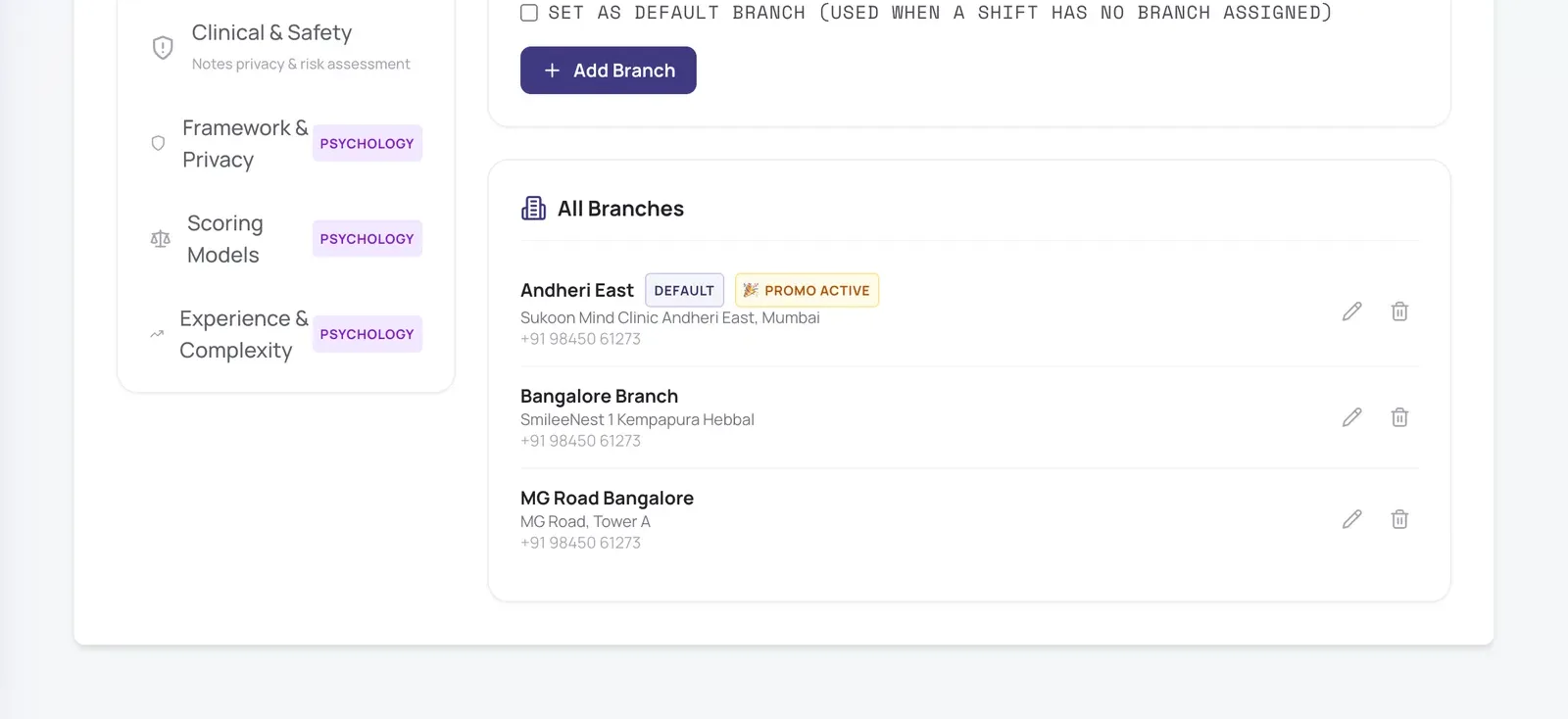
Each location has its own address, phone, map pin and prescription letterhead. Close one branch for a holiday without closing the rest, and run a launch offer at a single branch.
- Doctors set which branch each shift is at
- Patients pick the location when booking and see the right address
- Letterhead falls back to the clinic’s own when a branch has none
The right access for every role
Admins manage the practice, branch admins manage their own branch, receptionists book appointments, register patients and record payments taken at the desk, and clinicians see only their own patients’ notes.
In short
- “Doctors today” shows the front desk who is in, where, and their free times
- Front-desk staff never see clinical notes or patient messages
- Staff can be limited to one branch
Know how the practice is really doing
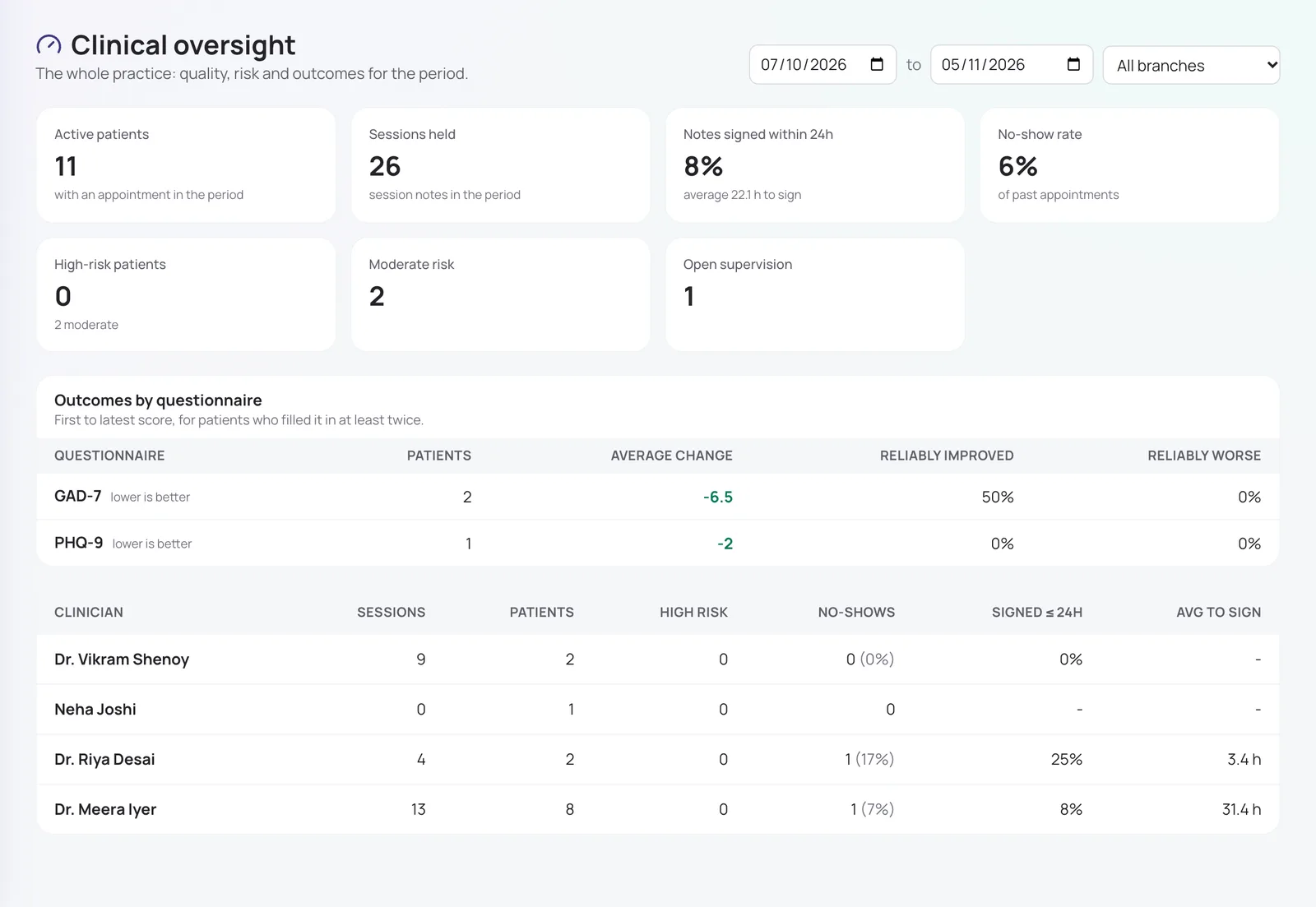
Clinical oversight shows active patients, sessions held, notes signed within 24 hours, no-show rate, patients at risk and outcomes by questionnaire, for the whole practice or one branch, and per clinician.
In short
- Supervisors see the same for the clinicians they supervise
- Outcome change uses published reliable-change thresholds
- Filter by branch and dates
An audit trail for every record
Every opening of a patient record or session note is logged, as is every change to it. Export who accessed a patient’s record when they ask, as India’s DPDP Act allows them to.
In short
- Field-level history of what changed
- Nothing is ever hard-deleted
- Records locked once a note is signed
Also included
Clinic booking page
One page listing your doctors, with their own booking links; keep it private if you prefer.
Payouts and earnings
See what each online payment brings in after gateway fees, and when it is paid out.
Patient alerts
Choose which messages go by app, SMS, WhatsApp or email.
Getting started checklist
A guided setup, with a sample patient to try everything safely.
How it works
- 1
Add your branches and staff.
- 2
Doctors set their weekly shifts at each branch.
- 3
Share the clinic page or each doctor’s booking link.
- 4
Track the practice from Clinical oversight.
Frequently asked questions
Can one doctor work at more than one branch?
Yes. Each shift in a doctor’s weekly schedule names its branch, so patients see the right location for every slot.
What can a receptionist do?
See which doctors are in today and their free times, register patients, book, reschedule and cancel appointments, and record payments taken at the desk, all for their own branch. They never see session notes, medical history or patient messages.
Can we limit a branch manager to their own branch?
Yes. A branch admin manages only their branch’s doctors, holidays, address and letterhead.
Is our patient data kept in India?
Files such as reports are stored with Amazon Web Services in Mumbai. Some service providers, for example AI services, may process data outside India; our Privacy Notice lists them.
Is every feature switched on from day one?
The essentials are on as soon as you sign up. Clinical and advanced features (questionnaires, safety plans, AI notes, supervision and so on) are switched on for your practice when you want them. Tell us what you need and we will turn it on.
How much does it cost?
Pricing depends on how many clinicians you have, the billing cycle you choose (monthly, quarterly, half-yearly or yearly) and whether you want AI features as a monthly add-on or pay per AI session. Start with a free trial, or send us a message and we will share a quote.
Try it with your own practice
Start a free trial, or tell us about your practice and we will share pricing and switch on the features you need.